 ClearDesk
 Business management for Windows
Business software you pay for once.
Not accounting software: a complete business management system. One payment. No monthly fees.
Contractors can buy ClearDesk IQ today for $79.99 once: see each job's profit, who owes you and what crew hours cost. The Restaurant Edition is coming soon.

Windows 10 or 11 PC. Buy and install from the Microsoft Store.
- One payment, no monthly fees
- Records stay on your PC
- Works offline
- No account to create
- No contract to sign
- Nothing renews
- Export any time (Excel or CSV)
- Try the sample company first
Which jobs made money, and who still owes you?
- Job profit forecast while the work is still going
- Who owes you, and how many days late
- Crew hours turned into real labor cost
$79.99 one time on the Microsoft Store
See the contractor pageWhat does each dish really cost to make?
- Food cost % and plate cost for every menu item
- Prime cost: food, drinks and labor against sales
- Vendor price changes, daily sales and cash
Restaurant Edition: in development, not yet available
Try the free food cost calculator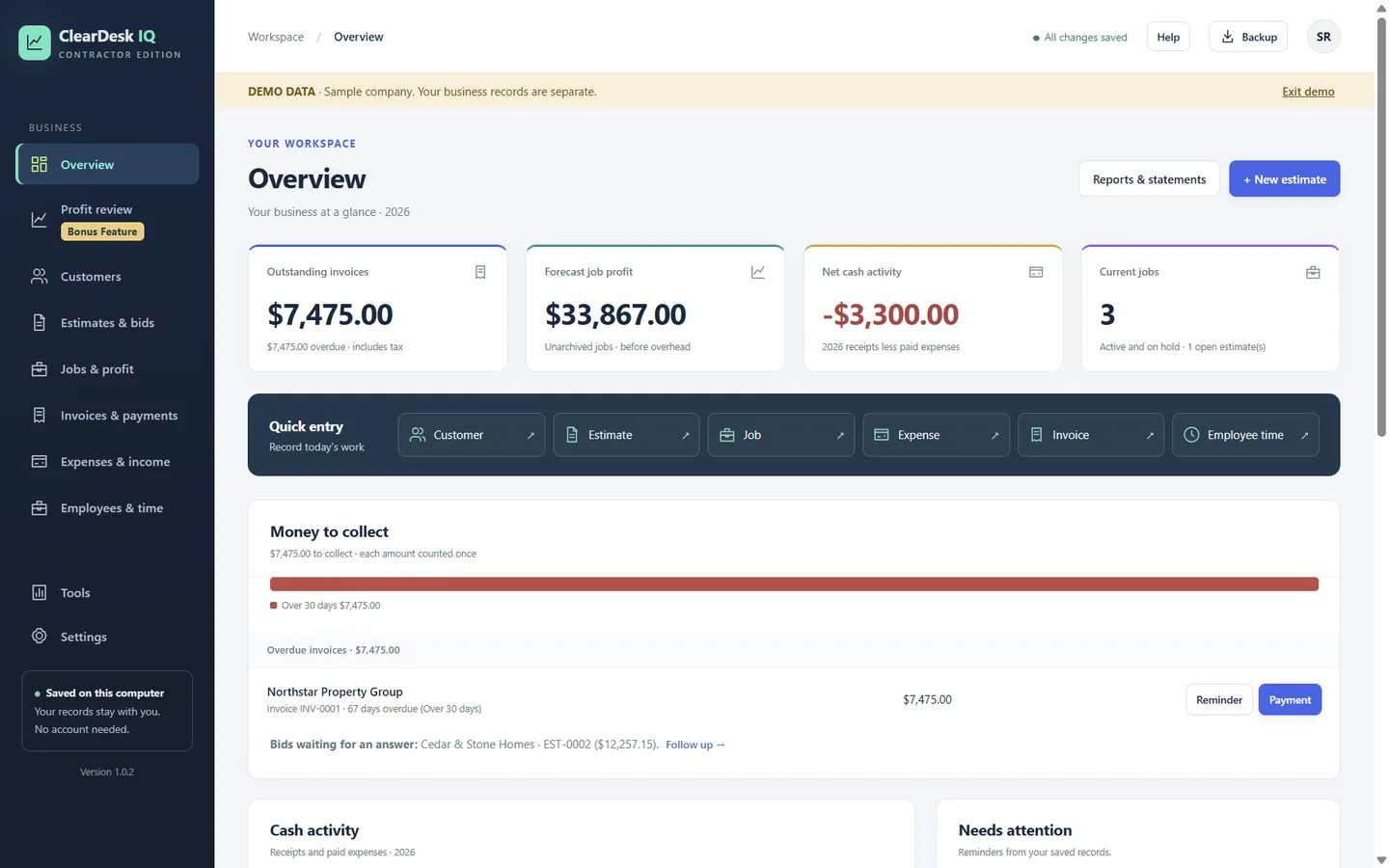
How it works
How do you get from purchase to profit?
Three steps, and no account to create.
Buy and install
Buy ClearDesk IQ once in the Microsoft Store and install it on your Windows PC. No account to create.
Add a customer and a bid
Enter the customer, price the work line by line, and see the margin before you send the PDF.
See the profit
Each job compares the bid with what you have spent and forecasts the final profit. Profit review flags what to fix.
Clear the clutter
Which of these problems do you have?
Common complaints small business owners raise about the software they pay for. Here is how ClearDesk IQ answers each one.
Everything in one desk
Is every feature in the one payment?
Yes. Every feature below is in ClearDesk IQ for contractors today, for one price. The Restaurant Edition will add kitchen numbers; see what is planned.
Quotes and estimates
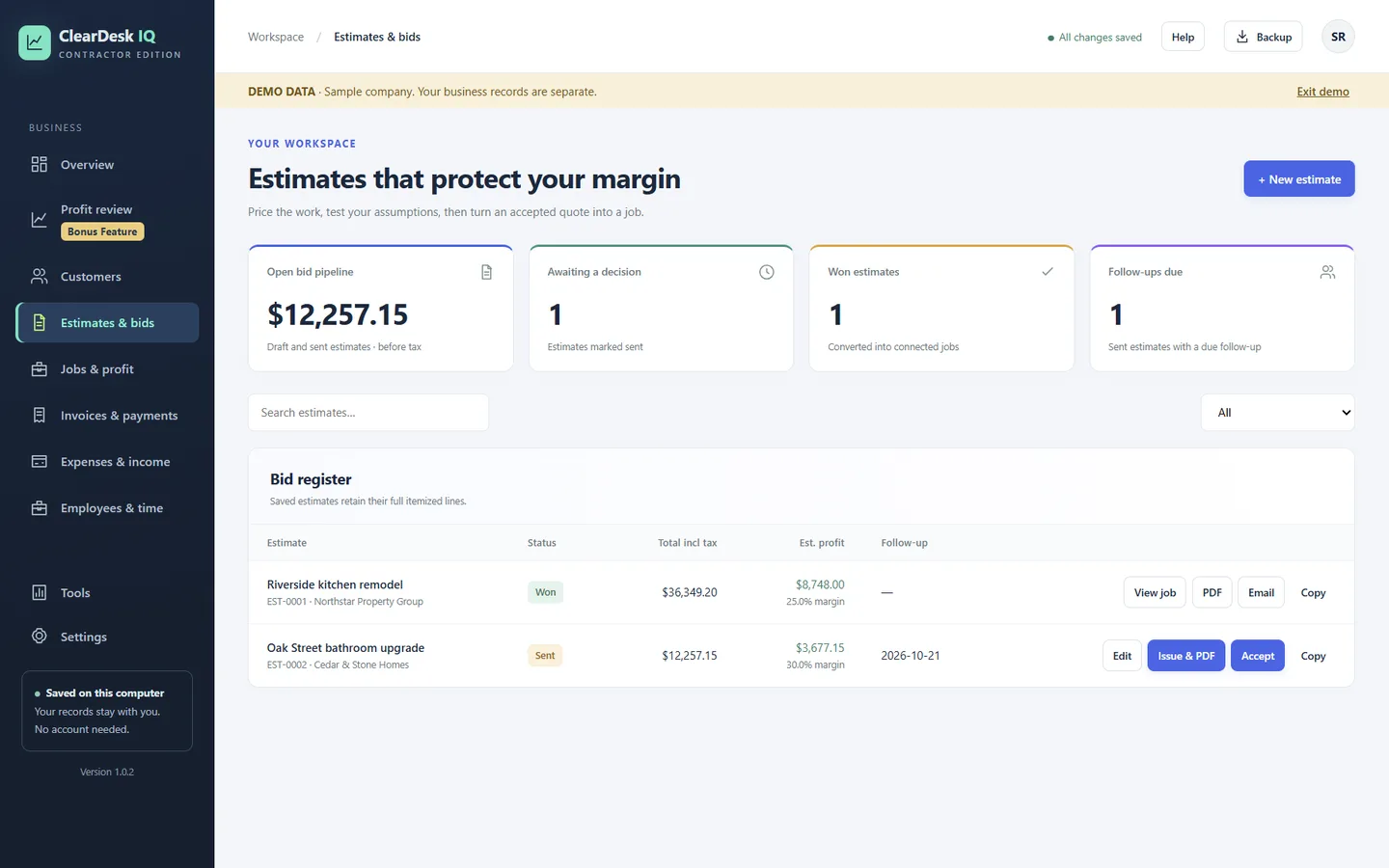
Price the work line by line with overhead, target margin, tax, deposit and discounts. See the profit before you send it.
Jobs with real profit
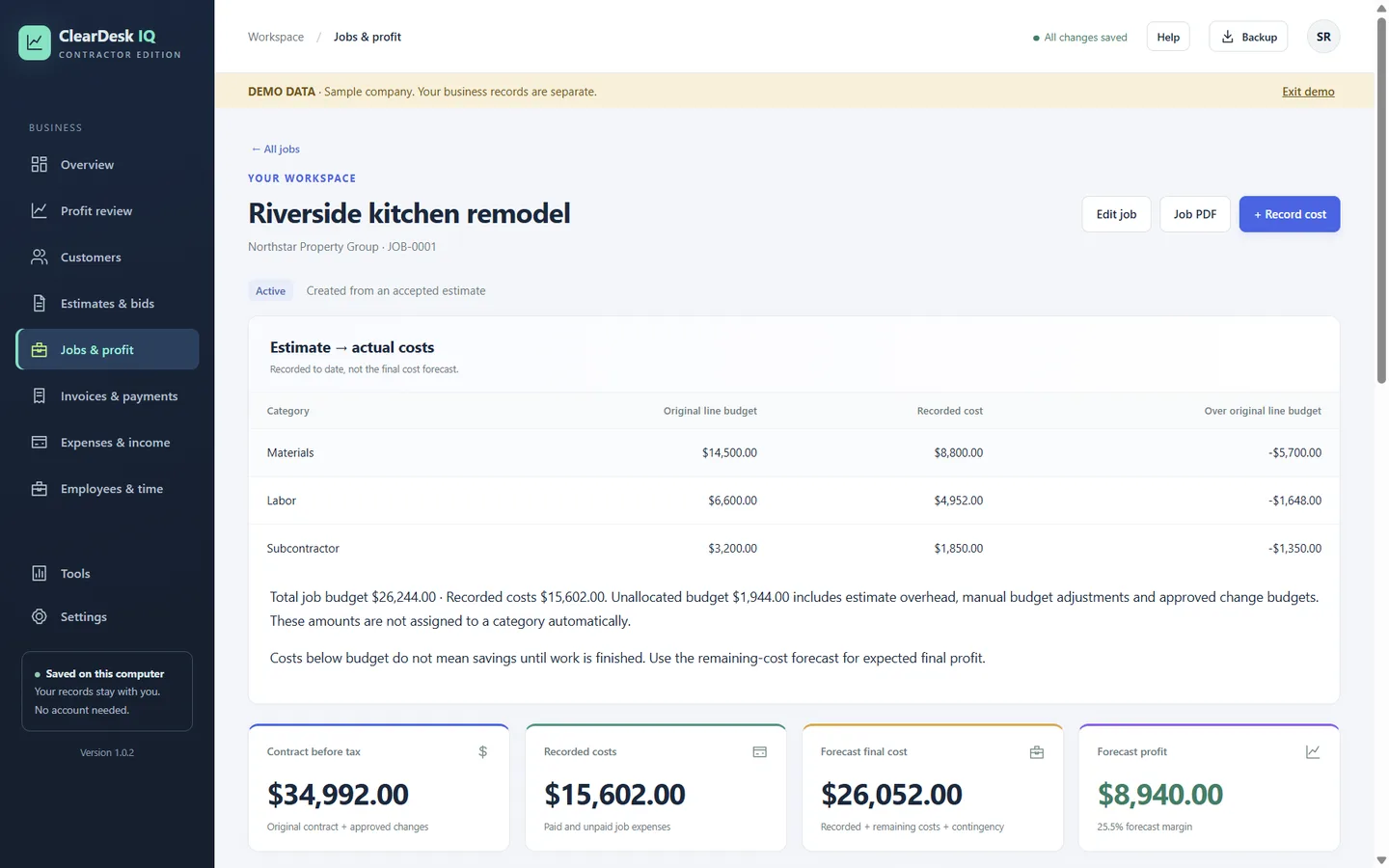
An accepted quote becomes the job, with no retyping. Track costs against the estimate and see the forecast profit.
Invoices and getting paid
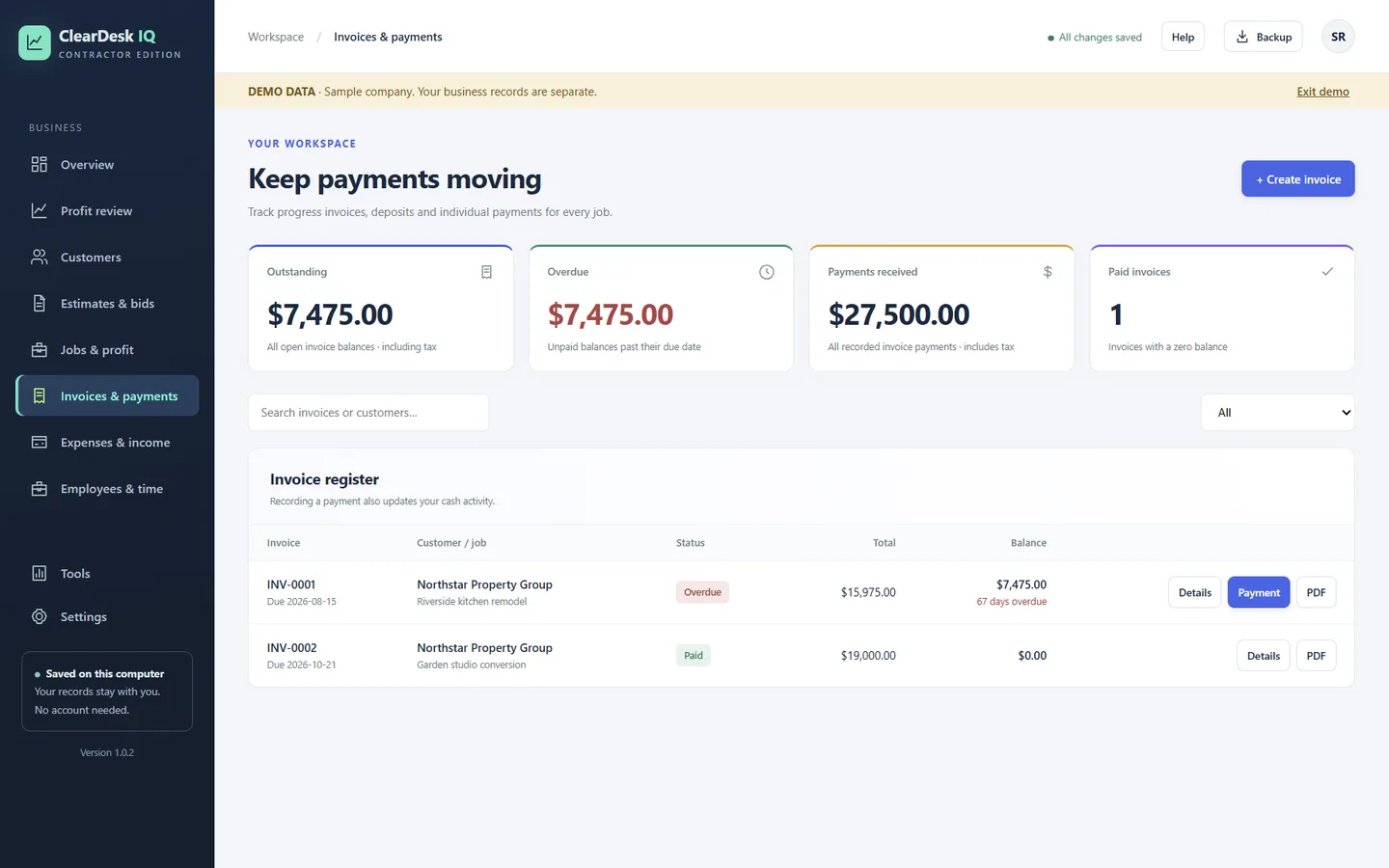
Deposit, progress and final invoices, payments, and a clear list of who owes you and how late.
Expenses with receipt photos
Record costs once, by job or overhead, and keep the receipt photo with the expense.
Employee hours and labor cost
Record hours with regular and overtime rates. Approved hours become the labor cost of the job.
Profit-leak detector
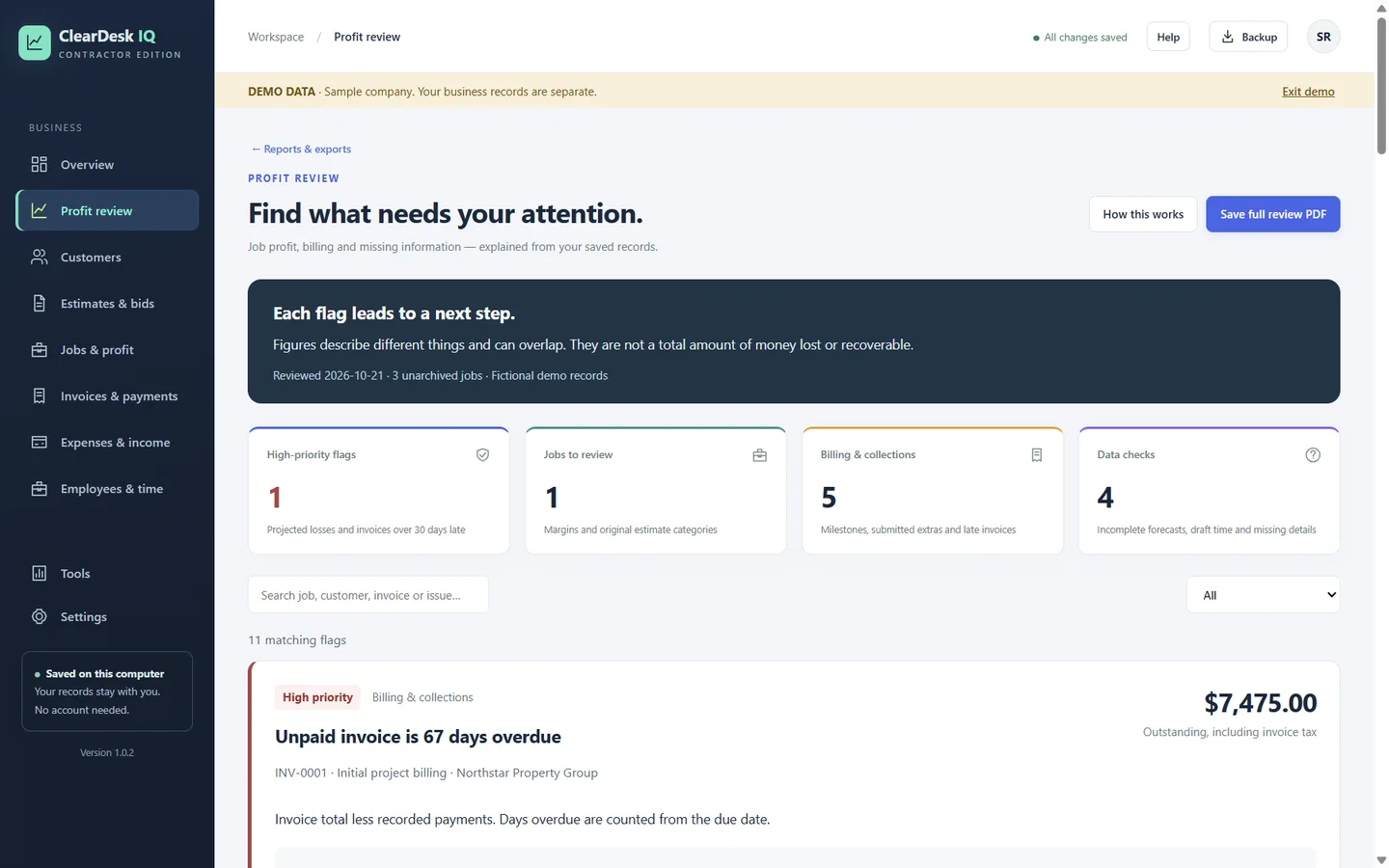
A bonus Profit review that flags losing jobs, late invoices, unbilled work and missing details.
13-week cash plan
See low-cash weeks before they happen, and test what a slow-paying quarter would do.
Overview at a glance
Money owed, forecast job profit, cash activity and today's quick entry on one screen.
Import and export
Bring your customer or price list from Excel or CSV. Export to Excel or accountant-ready CSV.
Office and laptop
Share records between the office computer and laptops on your own network. Laptops keep working offline.
Built-in help
141 searchable help articles inside the app, and the same answers in the online help center.
Backups you control
One click saves a complete backup file. Uninstalling the app does not delete your records.
Real screens
What does it look like?
Real screens from ClearDesk IQ for contractors, using the app's built-in sample company. Names and numbers are fictional.
Pricing
Will there be a monthly bill?
No. Buy ClearDesk IQ once on the Microsoft Store and keep using it. No subscription that keeps billing in a slow month, and no account to keep active.
$79.99One time, USD. The Microsoft Store shows the final price, including any tax, at checkout.
Who it's for
Which edition is for you?
Available now for contractors: estimates, jobs, subcontractors, change orders, progress invoices and retainage are built in. Remodelers, painters, electricians, plumbers, HVAC, roofers and handymen can start the same day.
Coming soon for restaurants: the Restaurant Edition is in development for independent restaurants, cafes, bakeries and food trucks. It is not available yet.
Quotes
Price the work and know the margin before you say yes.
Hours
Every approved hour becomes a real labor cost.
Money
Invoices, payments, expenses and a 13-week cash plan.
Profit
See which work makes money, and where it leaks.
Limits and who runs it
What does it not do, and who is behind it?
What it does not do
So you can decide quickly.
- It is not accounting software, and it does not file taxes or run payroll.
- It does not connect to bank feeds. You enter amounts yourself.
- It does not send email for you. It creates the PDF; you send it.
- No phone, tablet, Mac or web version. It is a Windows desktop app.
Who is behind ClearDesk IQ
ClearDesk IQ is made and supported by the ClearDesk IQ team. It is sold and installed through the Microsoft Store.
- Your records stay on your own computer. We do not hold a copy.
- Questions and support: summitechconsulting@gmail.com
- Read our Privacy and Terms pages.
Questions
What do people ask first?
What kind of software is ClearDesk IQ?
Not accounting software: ClearDesk IQ is a complete business management system for small businesses. It runs quotes, jobs, invoices, expenses, employee hours, profit and cash planning. For tax returns, payroll filings and a full ledger, keep using your accountant or payroll service, and give them the accountant-ready CSV export.
How much does it cost?
$79.99 USD, paid once on the Microsoft Store. There are no monthly fees and no subscription. The Store shows the final price, including any tax, at checkout.
What do I need to run it?
A Windows 10 (version 2004 or later) or Windows 11 PC, 64-bit (x64). It does not run on Mac, phones, tablets or Windows on ARM.
Do I need an account or an internet connection?
No account is needed, and the app works offline. You need the internet to buy and download it from the Microsoft Store.
Where are my records stored?
On your own computer, in a records folder inside your Windows user folder. Uninstalling or reinstalling the app does not delete them. The Backup button saves one complete file, including job and expense photos, that you can keep on a USB drive or another folder.
Could one app run the whole business?
Quotes, jobs, invoices, expenses, hours and profit in one Windows app. Your records stay on your computer.
$79.99One payment. No monthly fees.
- Windows 10 (version 2004 or later) or Windows 11
- No account needed. Works offline.
- No contract to sign. Nothing renews. Export any time.
- Sold and installed through the Microsoft Store